


PvP Domes Ascended
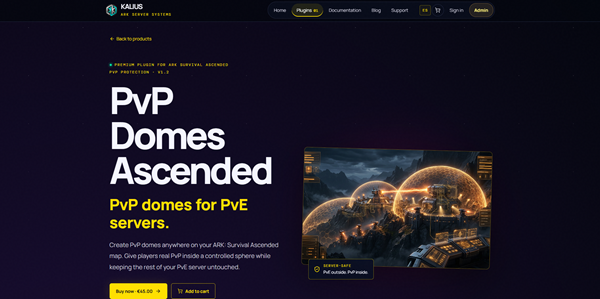
PvP domes for PvE servers, now with automatic events
Current version: v6.4
Keep your server PvE and give your players real PvP where you want it. PvP Domes Ascended lets admins create PvP domes anywhere on the map with a single command. Think of a boxing ring inside a peaceful park: inside the dome players can fight, outside nothing changes and PvE players are never affected.
Features
NEW in 6.4: ready for ARK's Unreal Engine 5.8 update
Rebuilt with AsaApi 2.1 for ARK v97 (Unreal Engine 5.8). Free update: your license keeps working. Your config.json and domes stay as they are: only replace PvPDomesAscended.dll and PluginInfo.json. Servers still on the old engine keep using v6.3.
Since 6.3: automatic events
All events come switched off, so updating changes nothing until you turn them on. Free update: your 1.x license keeps working.
Windows configurator (included)
How it works
Whole map PvP and tribe rules
Whole map PvP mode
Tribe rules, all configurable in config.json
Clusters: PvE on one map, PvP on another
Easier setup
Commands
All commands are admin only. Use them in the console with admincheat in front (recommended), or in chat with a /.
Event commands (type any of them alone to see all its options):
Examples
Configuration
Requirements
Installation
1. Copy the PvPDomesAscended folder to ShooterGame/Binaries/Win64/ArkApi/Plugins/
2. Put your license.key inside the plugin folder
3. Optional: add the AsaApiUtils mod to your -mods= list to see the domes
4. Start the server with AsaApiLoader.exe. The log should show [PvPDomes] License verified
5. Create your first dome with admincheat createpvpzone Arena 3000
A full guide in English and Spanish is included in the download. The plugin itself talks in English by default.
Compatibility notes
License and security notes
This is a paid plugin and needs a license.key to start. A license is valid for one server IP and up to an expiry date (or forever). For transparency:
Support and purchase
Join the Discord to buy the plugin or get support: https://discord.gg/SkNqnRtf4E
PvP domes for PvE servers, now with automatic events
Current version: v6.4
Keep your server PvE and give your players real PvP where you want it. PvP Domes Ascended lets admins create PvP domes anywhere on the map with a single command. Think of a boxing ring inside a peaceful park: inside the dome players can fight, outside nothing changes and PvE players are never affected.
Features
- Create a PvP dome with one command, at your position and with the radius you choose
- Entry and exit notification on screen and in chat every time a player crosses the border, with your own text, colors and display time
- Full PvP inside the dome: damage is enabled and players can loot each other
- Two types of dome, your choice when you create it:
- Open dome: everyone who is inside can fight and loot, no setup needed
- PvP-only dome with permission groups: only players in the groups you choose can fight. You can use the default groups from config.json or give each dome its own groups
- In PvP-only domes, players who are not in the groups cannot hurt anyone and cannot be hurt, so a PvE player cannot go in and attack the PvP players, and PvP players cannot kill a PvE player who walks through. Their dinos and bases are protected too, and they cannot build inside
- Tribe-aware: the whole tribe (members, dinos and turrets) counts as PvP or PvE, with configurable rules (see "Whole map PvP and tribe rules" below)
- No shooting into or out of the dome: nobody can damage players or dinos across the border
- Looting works only inside the dome: a body taken outside can no longer be opened or damaged, even if it is unconscious or being dragged
- Optional: make everything inside a dome indestructible (ideal for an admin-run coliseum), or make a protected no-PvP zone
- Optional: forbid building inside all domes
- Hide a dome without disabling it: it becomes invisible but the PvP zone keeps working. Show it again whenever you want
- The visible bubble is calibrated automatically to match the real PvP area
- Overlapping domes are blocked automatically, with a message telling you which dome is in the way
- Warning when you create a dome over other tribes' structures, dinos or players
- Each dome is saved in its own file, so you can back it up or copy it to another server
- Custom colors for each dome
- Rename the commands and write all messages in your own language
- Works with AntiPVEGriefing: its protections are switched off inside a PvP dome (configurable per dome), so players can fight and loot normally there
NEW in 6.4: ready for ARK's Unreal Engine 5.8 update
Rebuilt with AsaApi 2.1 for ARK v97 (Unreal Engine 5.8). Free update: your license keeps working. Your config.json and domes stay as they are: only replace PvPDomesAscended.dll and PluginInfo.json. Servers still on the old engine keep using v6.3.
Since 6.3: automatic events
All events come switched off, so updating changes nothing until you turn them on. Free update: your 1.x license keeps working.
- Supply drops: every X minutes a public crate with your own loot lands at one of the places you marked, with a heads-up 5 minutes before and the Lat/Lon. Pick items by name (no Blueprint paths), quality by name (Primitive ... Ascendant) and optional blueprints. One crate at a time, or one per place with a global limit
- Boss hunt: a Tek dome arena where bosses take turns (Broodmother, Megapithecus, Dragon, Nunatak, alphas... in Gamma, Beta and Alpha). The boss can't leave the dome. When it dies, a public reward crate appears in the middle. Bosses keep their own native level by default, and there is no reward if the boss dies with nobody in the arena
- Taming event: wild creatures appear at your spots for players to tame. Each spot can have its own creature (or a random one living on the map), level, sex, exact stats and colors (only color IDs that exist in ASA). If nobody tames it, it leaves; a creature that is being tamed gets extra time
- The event specimen (new): a random high level, champion stats in the stats that matter for that creature, event colors and a name over it so everyone knows which one is the event creature (the guards are always another species). When someone tames it, everybody is told that the reward is on its way, and a few seconds later a reward crate that anyone can open lands next to it
- More variety (new): the configurator fills every crate with 20 option groups plus random extras, so no two crates are the same, and the taming can pick from many more creatures
- Raid zones: a dome over a tribe's base. Every tribe that goes in is at war with the base and with the other tribes inside, and the war ends 30 seconds after they leave. No real tribe war is declared, so there is nothing to undo. Players without a tribe can't take part
- PvP in PvE for every event (optional): while a crate is on the map, a boss is awake or a creature is waiting, its area becomes a temporary PvP dome, 100 m by default so several tribes can battle. Players inside can attack each other, outside everything stays PvE. Same rules as the plugin's domes, and it can be limited to your PvP groups
- An audience for every event: for everyone, for some permission groups only (for example VIP-only crates, bosses and creatures that nobody else can open or hurt) or for the PvP players only. The messages can go only to that audience, in game and on its own Discord channel or role, or to everyone. In game, on Discord, both or off
- Hunting: the taming event can also be a hunt. Whoever kills the creature wins a reward crate right where it fell
- Automatic places: you don't have to mark anything. The plugin learns free places on your map by itself and checks each one before using it: no bases, beds, bags, players or bodies, outside your domes and raid zones, and never next to another event. If a place doesn't work, it tries the next one. Sea bosses go to the water, the rest on land. You can also use only your own places, or both (yours first)
- Defenders: guard creatures and turrets around crates, bosses and taming creatures. Choose which ones (with chances), how many, their level (or the recommended one), the ammo (recommended, your choice or unlimited) and the rules: they can't be tamed, leave nothing when they die and can't be lured out of the dome
- Chances: the better the item, boss or creature, the rarer it is. Every loot line can have a chance, lines can be grouped so only one of them comes, bosses come by their chance, and each taming place can have several possible creatures. A crate is never empty
- Smart places: crates and creatures skip places where players have built or are standing, crates can't be placed in water or lava, sea bosses and creatures only go to water arenas and spots, and the boss arena grows to the size the boss needs (alphas 100 m up to Titans 300 m)
- Discord announcements: one webhook for everything or a channel for each event type, mentions (@everyone or roles), message templates with emojis and Lat/Lon, and a test command
- Event log: /pvplog shows the last 40 event messages and problems, even after a restart
- Catalog: choose items, creatures and bosses by name. Creatures and bosses are read from your own server, mods included; mod items work with their Blueprint path or a giveitem line
Windows configurator (included)
- Opens with a double click, nothing to install (a Node.js version is included too)
- English and Spanish, written so that even someone who has never played ARK understands every option: every field has a help bubble with an example, and there is a glossary
- Generate with one click: choose a style (Beginner, Balanced, Hunting & taming, Endgame, PvP/Raid) and a size, and it fills the drops, the boss list and its reward, and your taming spots with balanced values: value budget per crate, quality limits, safe boss levels and bosses and creatures that fit your map. The same seed always gives the same result
- Choose automatic places, your own places or both. Loot, bosses and creatures come with chances: the better, the rarer
- Review everything with quality colors, values and chances, see the exact JSON that will be saved, change anything by hand, and save with an automatic backup. It only touches the events part of config.json: your domes and settings stay as they are
- No configurator? The plugin's Examples folder has a ready automatic config and a manual one
How it works
- Both players inside the same dome: they can fight
- One inside and one outside: no damage
- Both outside: normal PvE
- Wild dinos, falls, cold and heat work as usual inside and outside
- The dome is a sphere: it also counts upwards and downwards, so if you fly high above it you are outside
Whole map PvP and tribe rules
Whole map PvP mode
- Turn the whole map into a PvP area only for the players in your PvP groups: they can fight each other (and raid each other's bases and dinos) anywhere, while everyone else stays fully PvE
- Players who are not in the groups cannot hurt the PvP players and cannot be hurt by them
- Switch it on and off in game, no restart needed:
- admincheat pvpwholemap on - whole map PvP for the groups in config.json
- admincheat pvpwholemap on PvP,VIP - whole map PvP for these groups
- admincheat pvpwholemap off - back to domes only
- admincheat pvpwholemap - shows the current mode
- Your domes keep working the same: an open dome lets everyone fight inside, and a dome without PvP is a safe zone for everyone
- Players get a message when they log in and whenever they change between PvP and PvE
- listpvpzones, reloadpvpzone and the server log always show the current mode (domes only or whole map) and how many domes are active
Tribe rules, all configurable in config.json
- TribeRule:
- "Any" - one member of the tribe in the PvP group makes the whole tribe PvP
- "All" - every member must be in the group. If a PvP tribe invites a PvE player, the tribe becomes PvE, so nobody can drag a PvE player into PvP
- OfflineProtection:
- true - a PvP tribe with nobody online is protected
- false - PvP tribes can be raided while offline (the plugin checks all tribe members, online or not)
- PvEAllies:
- "Block" (default) - a PvP tribe and a PvE tribe can't become allies. The alliance invite is refused with a message
- "Allow" - a PvE tribe allied with a PvP tribe stays PvE
- "BecomePvP" - allying with a PvP tribe makes you PvP while the alliance lasts, so nobody can use a PvE ally's dinos or base as a shield
- TribeInvites:
- "Block" (default) - no mixed tribes: a PvE player can't accept an invite from a PvP tribe and a PvP player can't join a PvE tribe. They get a message explaining why
- "Allow" - players can join a tribe of the other kind (TribeRule decides what happens)
- AllowAllyDamage: allied tribes never damage each other by default, not even in PvP areas. Set it to true to let allies fight inside PvP areas
- The tribe owner has no special role: every member counts the same
Clusters: PvE on one map, PvP on another
- Each map can use its own PvP group, so a player can be PvP on one map and PvE on another, even with a shared Permissions database
- Write "PvPGroups": [ "PvP_{map}" ] and the plugin replaces {map} with the map's name (PvP_TheIsland, PvP_ScorchedEarth...). One config.json works on every map
- Create each group once in Permissions (admincheat Permissions.AddGroup PvP_TheIsland) and add players only on the map where they want PvP
- MapName: "auto" reads the map's name from the game. You can also write it by hand, just in case
Easier setup
- An Examples folder is included inside the plugin: a full example config, an open dome, a PvP-only dome, and a help file in English and Spanish that explains every single option
Commands
All commands are admin only. Use them in the console with admincheat in front (recommended), or in chat with a /.
- createpvpzone Name [radius] [pvp | Group1,Group2] - Creates a dome where you stand. Default radius is 2000 (100 units = 1 meter). Add pvp for a PvP-only dome using the groups of config.json, or list your own groups separated by commas
- listpvpzones - Shows the current mode and lists all domes with position, size and options
- hidepvpzone [Name] - Hides a dome (PvP keeps working)
- showpvpzone [Name] - Shows it again
- deletepvpzone [Name] - Deletes a dome
- reloadpvpzone - Reloads config.json and the domes without restarting
- pvpwholemap [on | off] [Group1,Group2] - Whole map PvP for the groups on or off (saved in config.json). Without arguments it shows the current mode
Event commands (type any of them alone to see all its options):
- pvpdrop - addpoint, additem metal ingot 200, interval, warning, mode, max, now, on / off
- pvpboss - setarena 100, add broodmother gamma, add alpha rex 60, additem, respawn, now, on / off
- pvptame - addspot, set 1 rex 150, sex, stats, colors, interval, wait, now, on / off
- pvpraid - add 200 60 (200 m, closes after 60 minutes), list, del, leave, on / off
- pvpdiscord - webhook, mention, type, test, on / off
- pvpcatalog - items, dinos or bosses by name
- pvplog - the last event messages
Examples
- admincheat createpvpzone Arena 3000 - Open dome, 30 m radius
- admincheat createpvpzone ZonaPvP 5000 pvp - PvP-only dome using the default groups
- admincheat createpvpzone Torneo 4000 Warriors,VIP - PvP-only dome for the groups Warriors and VIP
- admincheat pvpwholemap on PvP - Whole map PvP for the PvP group
Configuration
- config.json, General: building rules, default PvP groups, tribe rules (TribeRule, OfflineProtection, PvEAllies, AllowAllyDamage), bubble size calibration (automatic by default), notification time, debug log
- config.json, WholeMapPvP: whole map mode on/off, its groups, AntiPVEGriefing on/off for PvP players
- config.json, Commands and Messages: command names and all messages
- Zones\Name.json (one file per dome): enabled, position, radius, force PvP, prevent structure damage, show bubble, AntiPVEGriefing on/off, PvP-only on/off, groups, bubble color, custom enter/leave messages
- config.json, Events: supply drops, bosses, taming, raid zones and Discord (or use the configurator)
- Changes apply in about one second after reloadpvpzone. Command names need a server restart
- Every option is explained in config_help.json and in the Examples folder (CONFIG_HELP_EN.txt and AYUDA_CONFIG_ES.txt), with a full events example made with the configurator
Requirements
- ARK: Survival Ascended dedicated server
- AsaApi 2.1 or newer (ARK v97 / Unreal Engine 5.8)
- Internet access on the server (for the license check)
- Optional: the mod AsaApiUtils (CurseForge ID 955333) so players can see the domes and the on-screen notifications. Without it everything works but the domes are invisible. Players download it automatically
- Optional: the Permissions plugin from this site, needed for PvP-only domes with groups and for whole map PvP. Open domes always work without it
- Optional: AntiPVEGriefing, with "AdminsIgnoreProtection": true in its config
- Optional: a Discord webhook for the event announcements
- The configurator runs on any Windows 10/11 PC (no install). It edits the config.json you choose: copy it from your server and back, or open it on the server machine
Installation
1. Copy the PvPDomesAscended folder to ShooterGame/Binaries/Win64/ArkApi/Plugins/
2. Put your license.key inside the plugin folder
3. Optional: add the AsaApiUtils mod to your -mods= list to see the domes
4. Start the server with AsaApiLoader.exe. The log should show [PvPDomes] License verified
5. Create your first dome with admincheat createpvpzone Arena 3000
A full guide in English and Spanish is included in the download. The plugin itself talks in English by default.
Compatibility notes
- AntiPVEGriefing: works together. Inside a dome its protections are switched off so you can loot defeated players and pick up their drops. In whole map mode it stays on outside the domes unless you switch it off in config.json. It does not give admin rights to anyone.
- Permissions: used to read the PvP groups. The plugin never adds or removes anyone from a group
- AutoBases: works together, but don't place a dome over a raidable base: damage between inside and outside is blocked
License and security notes
This is a paid plugin and needs a license.key to start. A license is valid for one server IP and up to an expiry date (or forever). For transparency:
- License check: runs at startup and then every 10 minutes. It reads the server's public IP from public services (api.ipify.org, checkip.amazonaws.com, icanhazip.com).
- Revocation list: a signed list of disabled licenses, downloaded from a public GitHub Gist. It only contains license IDs.
- No internet? If the server loses internet for a while the plugin keeps working and retries. It only turns itself off after 24 hours without a successful check.
- Obfuscated strings: license messages are obfuscated as anti-piracy protection.
- AntiPVEGriefing hook: only affects AntiPVEGriefing for players inside a PvP area; it does not grant admin rights.
- Discord (only if you turn it on): event messages, which can include player or tribe names and map coordinates, are posted to YOUR Discord webhook. Nothing else is sent.
- The plugin does not send player or server data anywhere else, does not execute downloaded files, does not open ports and only writes inside its own folder (config.json, the Zones and Catalog folders and EventLog.json).
- The configurator only listens on your own PC (127.0.0.1), only edits the config.json you open (it makes a backup first) and closes itself when you close its window.
Support and purchase
Join the Discord to buy the plugin or get support: https://discord.gg/SkNqnRtf4E