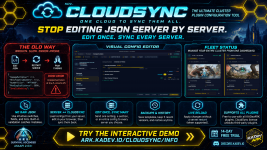


STOP FIGHTING JSON.
EDIT ONCE. UPDATE YOUR ENTIRE CLUSTER.
Your plugin settings. One workspace. Countless hours saved.
Load from your server. Edit visually. Sync to the servers you choose.
WORKS FOR: KADEVARK PLUGINS & ALL THIRD-PARTY PLUGINS
FREE to use with ALL KADevARK plugins | License required for third-party plugins.
14-DAY FREE TRIAL
See it in action with the fully interactive demo.
EXPLORE CLOUDSYNC - CLICK HERE FOR INTERACTIVE DEMO
YOUR DATA, SECURITY, AND SAFETY
YOU ARE IN CONTROL | LOCAL-FIRST | EVERYTHING OPT-IN | SECURE, SAFE, AND ENCRYPTED
Your configuration values stay on your game server until you explicitly approve their upload.
Opening the editor does not upload them.
LOCAL FIRST. APPROVAL REQUIRED.
CloudSync first requests field names and types, without their values. You see what is available to load while the actual settings remain local.
Everything starts unchecked. Nothing is selected for you.
Uploading configuration values requires all four steps:
NO CONFIGURATION VALUES ARE UPLOADED UNTIL YOU COMPLETE THESE STEPS.
You can change your selection or cancel before final approval.
PROTECTED BEFORE UPLOAD
Your choices are enforced by the plugin on your game server, before values are sent.
SECURITY BUILT INTO THE SERVICE
CloudSync operates under an extensive security policy built around industry best practices, including:
You decide which additional fields remain private. Select only the values you want stored in CloudSync for browser editing.
YOU CHOOSE WHAT TO SHARE.
YOU REVIEW THE SELECTION.
YOU GIVE THE FINAL APPROVAL.
Opening the editor does not upload them.
LOCAL FIRST. APPROVAL REQUIRED.
CloudSync first requests field names and types, without their values. You see what is available to load while the actual settings remain local.
Everything starts unchecked. Nothing is selected for you.
Uploading configuration values requires all four steps:
- CHOOSE: Select the fields you want to load. Leave private settings unchecked.
- REVIEW: A separate review screen shows your selection. Check it, change it, or cancel.
- ACKNOWLEDGE: Tick the required checkbox confirming that you reviewed your selection and agree to upload and store those values in CloudSync.
- APPROVE: Press "Confirm and load." Only then can your server send the approved values.
NO CONFIGURATION VALUES ARE UPLOADED UNTIL YOU COMPLETE THESE STEPS.
You can change your selection or cancel before final approval.
PROTECTED BEFORE UPLOAD
Your choices are enforced by the plugin on your game server, before values are sent.
- Unselected values stay local. Only approved values are included in the upload.
- Protected fields stay blocked. They cannot be selected, even through "select all."
- New fields need fresh approval. Adding a setting does not automatically give CloudSync access to it.
- Excluded settings stay intact. Leaving a field out does not blank or delete it from your server.
- Your comments stay local. Loading your configuration does not remove your server-side comments.
SECURITY BUILT INTO THE SERVICE
CloudSync operates under an extensive security policy built around industry best practices, including:
- Encrypted connections to protect data during transfer.
- Access controls to restrict access to your configurations.
- Automatic secret protections to block recognised sensitive fields.
- Explicit approval before selected configuration values are uploaded.
You decide which additional fields remain private. Select only the values you want stored in CloudSync for browser editing.
YOU CHOOSE WHAT TO SHARE.
YOU REVIEW THE SELECTION.
YOU GIVE THE FINAL APPROVAL.
BUILD YOUR SERVER. CONFIGURE YOUR PLUGINS. DON'T WASTE TIME WITH JSON.
Changing your cluster settings should take minutes, not an evening of opening files, checking commas, and repeating edits across servers.
CloudSync brings that work into one place.
Choose which settings to load from your game server, edit them in your browser, and send your changes back to one server or your selected cluster.
- EDIT SETTINGS, NOT SYNTAX: Use switches, number fields, and lists instead of manually editing raw JSON. Built-in validation helps catch configuration errors before you sync.
- EDIT ONCE. UPDATE MANY. Sync a setting, section, or configuration within your approved fields. Choose the servers that receive your changes.
- START WITH YOUR ACTUAL SERVER SETTINGS: Load your current configuration directly from a connected server. Choose what to bring into the editor and work from there.
- KEEP THE SETUPS THAT WORK: Save reusable templates for your preferred settings. Spend less time rebuilding the same configuration.
- RESTORE AN EARLIER VERSION: CloudSync keeps five recent configuration versions so you can return to an earlier setup.
- RELOAD WITHOUT A RESTART: Use live reload to apply changes when the target plugin supports it.
CHOOSE & LOAD → EDIT IN YOUR BROWSER → SELECT SERVERS → SYNC
ONE SERVICE. CONTINUOUS IMPROVEMENT.
CloudSync is an actively maintained cloud service, with ongoing improvements to the editor, website, backend, and plugin.
Website and backend updates are delivered centrally, so those improvements do not require you to install a new plugin build.
READY FOR YOUR SERVERS
- ARK: Survival Ascended with AsaApi 2.03+.
- Included with eligible paid KADevARK plugin licenses for their supported plugins.
- A standalone CloudSync license unlocks supported third-party plugins.
- More than 10 supported languages across the service.
LESS CONFIG WORK.
MORE TIME FOR YOUR COMMUNITY.
Explore the interactive demo and start your 14-day free trial.
TRY CLOUDSYNC NOW
Questions about your setup or plugin support?
TALK TO US ON DISCORD